Clawdbot AI has recently taken the tech world by storm, prompting people to rush out and buy Mac minis just to run it. Now renamed Moltbot, this open-source AI assistant is shaking up how we think about productivity tools. Unlike typical chatbots, Moltbot actually takes action instead of just talking – clearing your inbox, sending emails, managing your calendar, and even handling flight check-ins.
What makes the transition from Clawdbot to Moltbot particularly interesting is how quickly it’s gone viral. This isn’t surprising when you consider what it offers – an AI assistant that feels like a real teammate, available 24/7, and completely customizable. Additionally, you can interact with it through messaging apps you already use, like WhatsApp and Telegram, making it seamlessly fit into your workflow.
Furthermore, Moltbot runs in the background on your own hardware, giving you something most cloud-based AI assistants can’t – true privacy and control. In fact, the system delivers compounding value when treated like a proactive teammate with clear expectations. With over 50+ integrations, it connects to software you already pay for, multiplying its usefulness across your digital life.
In this article, we’ll explore everything you need to know about this groundbreaking AI assistant – from its origins as Clawdbot to its current incarnation as Moltbot, how to set it up, and whether it deserves a place in your productivity toolkit.
What Is Moltbot (Formerly Clawdbot) and How Does It Work?
Moltbot began its life as Clawdbot, a project that rocketed to viral status almost overnight. This remarkable AI assistant represents a significant leap beyond conventional chatbots, offering genuine agency and action rather than mere conversation.
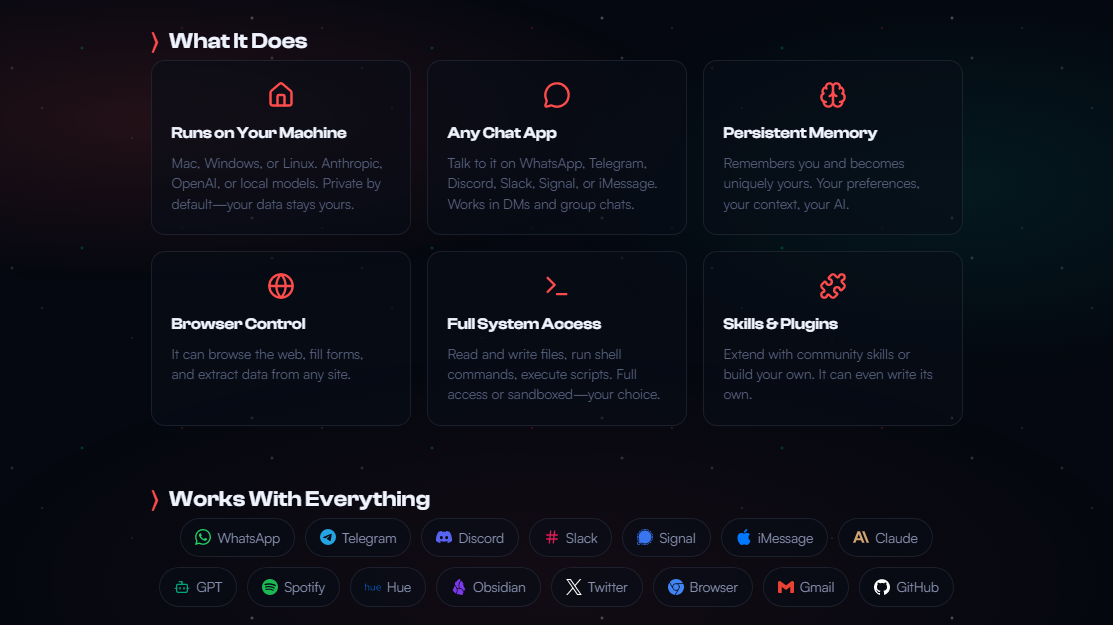
Here are the tasks which Moltbot can perform and applications with it can integrate.
From Clawdbot to Moltbot
Peter Steinberger, an Austrian developer who previously sold his company PSPDFKit for approximately $119 million, created this tool initially for his personal use. After feeling creatively stalled for nearly three years, Steinberger found new inspiration in AI development. The project gained tremendous traction upon release, amassing 9,000 GitHub stars within just 24 hours and exceeding 61,000 stars by late January 2026.
Nevertheless, the rapid rise came with complications. Anthropic, the company behind Claude AI, sent a “friendly” email regarding trademark concerns over the similarities between “Clawd” and “Claude”. Consequently, the project underwent rebranding from Clawdbot to Moltbot. This name change cleverly references how lobsters molt to grow – shedding their old shell to emerge larger and stronger.
Core Capabilities: Beyond Just Chat
You’ll find Moltbot stands apart from standard AI assistants through three fundamental pillars. First, it maintains persistent memory across conversations – remembering your preferences, project details, and communication style over time. Second, unlike reactive chatbots, Moltbot operates proactively – staying active 24/7 and initiating contact when tasks complete. Third, it delivers genuine automation through extensive integrations with everyday tools.
The system lives where you already communicate – WhatsApp, Telegram, Slack, Discord, and other messaging platforms. This approach transforms casual chat into a powerful command layer for automation.
Offline and Self-Hosted by Design
The heart of Moltbot’s architecture is a component called the Gateway – a Node.js process that runs continuously on your system. This gateway handles all messaging connections, coordinates the AI agent, and routes communications between various services.
Moreover, Moltbot operates entirely on infrastructure you control rather than as a managed cloud service. You can deploy it on your personal computer, a VPS, or dedicated hardware like a Raspberry Pi. This self-hosted nature delivers superior privacy, transparency, and control over your digital assistant’s actions and data.
Features and Real-World Uses of Moltbot AI
The real power of Moltbot reveals itself through its practical applications that genuinely save hours each week. This isn’t just another chatbot—it’s a digital teammate that executes tasks while you focus elsewhere.
Inbox and Calendar Automation
Moltbot excels at clearing your inbox by filtering spam, organizing messages into folders, and even drafting responses to common questions. You can simply text “delete all promotional emails from last month” while commuting, and it handles the rest. For calendar management, I’ve found it remarkably helpful—it adds events with appropriate travel buffer times and even sends meeting invites directly through its own calendar when privacy concerns arise.
Daily Briefs and Task Execution
One of the most valuable features is Moltbot’s ability to generate personalized morning briefings. These comprehensive reports combine weather updates, pending tasks, priorities, and relevant information from your connected accounts. Through persistent memory, your AI assistant remembers your preferences and adapts these briefs over time. You’ll receive scheduled notifications based on your calendar and custom “heartbeats” that check if you need assistance throughout the day.
Multi-Tool Integration (Slack, Telegram, etc.)
Moltbot truly shines through its multi-channel capability, connecting simultaneously to:
- WhatsApp for personal tasks
- Telegram for quick commands
- Discord for team collaboration
- Slack for workplace automation
This isn’t just about having multiple bots—it’s one assistant with shared memory across platforms. You might start a conversation on WhatsApp and continue later on Telegram without losing context, since all interactions route through the central Gateway component.
Agent Teams and Subtask Delegation
Perhaps the most groundbreaking feature is Moltbot’s sub-agent architecture. This system allows you to spawn independent worker sessions that handle tasks in parallel while your main conversation continues uninterrupted. Instead of sequentially researching five competitors, you can assign five sub-agents to work simultaneously. Each sub-agent maintains its own isolated context, executes independently, and reports back when complete—transforming how efficiently you can collaborate with AI.
Setup and Deployment Options: Local vs Cloud
Setting up your personal AI assistant offers multiple deployment paths depending on your needs and technical comfort. From local hardware to cloud solutions, you have several options for running this versatile tool.
Running on Mac Mini or Studio (Clawbot Mini Mac)
Despite the surge in Mac Mini purchases for running Moltbot, you don’t necessarily need dedicated Apple hardware. However, the popularity makes sense—Mac Minis provide an all-in-one solution with their efficient M-series chips. The setup process takes just 5-30 minutes, requiring only basic terminal knowledge. I’ve found the installation remarkably straightforward—simply copy the one-liner curl -fsSL https://clawd.bot/install.sh | bash into your terminal, and follow the setup wizard.
Using Cloudflare Workers with Moltworker
For those preferring cloud deployment, Cloudflare offers Moltworker—a specially adapted version running on their infrastructure. This option requires a** Workers paid plan (USD 5.00/month) plus an Anthropic or OpenAI API key**. Accordingly, you gain always-on availability without dedicated hardware, plus enhanced security through Cloudflare’s sandbox isolation.
GitHub Moltbot Setup and Configuration
The GitHub approach provides maximum flexibility. You can deploy Moltbot on virtually any platform—from USD 3.50/month VPS services to repurposed old computers. Even a Raspberry Pi works for lightweight usage. Additionally, Docker containers offer another deployment method for those with existing server setups.
Model Strategy: Opus as Brain, Codex as Muscle
Many experienced users employ a dual-model strategy—using Anthropic’s Claude Opus as the “brain” for reasoning and OpenAI’s Codex as the “muscle” for coding tasks. This approach optimizes performance by leveraging each model’s strengths. Furthermore, OpenAI models prove especially reliable for programming-heavy workflows, while Claude excels at nuanced reasoning.
Security, Privacy, and Control Considerations
The power of running an AI agent with system access comes with significant security implications. Moltbot’s ability to execute commands, access files, and interact with your services creates a complex security landscape that requires careful consideration.
Prompt Injection and Secrets Management
Prompt injection remains a major vulnerability for AI agents like Moltbot. Attackers can craft malicious messages that manipulate the model into bypassing safety guidelines or executing harmful commands. Even modern models aren’t completely immune to this threat. I’ve learned that treating external content (emails, web pages, attachments) as potentially hostile is essential. You should always keep inbound DMs locked down through pairing/allowlists and avoid “always-on” bots in public rooms.
Secrets management presents another critical challenge. Your Moltbot workspace typically stores API keys, OAuth tokens, and credentials that could be exposed. Indeed, GitGuardian detected 181 unique secrets leaked from repositories containing clawdbot or moltbot keywords. Generally, following the principle of storing secrets securely and rotating them regularly helps minimize risks.
Audit Trails and Least Privilege Access
Implementing comprehensive logging for every action your AI assistant attempts creates accountability. Obviously, this provides visibility into exactly what commands were executed and what files were accessed. For better security, configure Moltbot to run with the minimum permissions necessary rather than administrator access.
Why Enterprises Should Start with Pilots
Enterprises should begin with controlled pilots in specific departments before wider deployment. Start with read-only permissions and expand slowly once security practices mature. Executive operations, sales support, and internal knowledge retrieval represent ideal first use cases with appropriate guardrails.
Conclusion
Moltbot represents a significant shift in how we think about AI assistants. The transition from cloud-dependent chatbots to self-hosted, action-oriented tools marks a new era for personal productivity. You gain complete control over your data while still enjoying advanced capabilities that actually save time in your daily routine.
After testing Moltbot extensively, I can confidently say its value compounds over time. The assistant learns your preferences, adapts to your workflow, and becomes increasingly helpful with each interaction. This stands in stark contrast to conventional chatbots that merely respond to prompts without building meaningful context.
The flexibility of deployment options makes Moltbot accessible regardless of your technical expertise. You might prefer the simplicity of a Mac Mini setup or the always-on reliability of a cloud implementation through Cloudflare. Either way, the initial investment pays dividends through hours saved each week on repetitive tasks.
Security concerns deserve serious consideration, though. Your AI assistant needs appropriate guardrails and permissions. Most users should start with restricted access and gradually expand capabilities as trust builds. The ability to review audit logs provides an additional safety layer that traditional cloud AI services typically lack.
Therefore, Moltbot emerges as much more than a passing tech trend. This powerful tool transforms how you manage digital tasks by executing them rather than just discussing them. The offline nature, combined with extensive integrations and genuine agency, creates something truly different in the AI assistant landscape.
Ultimately, whether you still call it Clawdbot or embrace the new Moltbot identity, this open-source assistant offers a glimpse into a future where AI becomes a genuine teammate rather than just another app. You might find, as I did, that having a personalized AI assistant working alongside you changes your relationship with technology altogether.
All this information is Open-Source and also avaliable at Moltbot’s official site, you can also get more deeper information from here.
Frequently Asked Questions
What is Moltbot and how does it differ from other AI assistants?
Moltbot is an open-source AI assistant that runs offline on your own hardware. Unlike typical chatbots, it takes action by automating tasks like managing your inbox, calendar, and even flight check-ins. It integrates with multiple messaging platforms and offers true privacy and control.
How can I set up Moltbot on my device?
You can set up Moltbot in various ways. For Mac users, it’s as simple as running a command in the terminal. You can also deploy it on cloud platforms like Cloudflare Workers, or set it up on virtually any platform using GitHub. The setup process is generally straightforward and takes between 5-30 minutes.
What are some key features of Moltbot?
Moltbot offers inbox and calendar automation, generates personalized daily briefs, integrates with multiple communication tools (like Slack and Telegram), and can delegate tasks to sub-agents. It maintains persistent memory across conversations and operates proactively, initiating contact when tasks are completed.
Is Moltbot secure to use?
While Moltbot offers enhanced privacy by running on your own infrastructure, there are security considerations. It’s important to manage secrets carefully, implement audit trails, and follow the principle of least privilege access. For enterprises, it’s recommended to start with controlled pilots before wider deployment.
Why was Clawdbot renamed to Moltbot?
The project was initially named Clawdbot but was rebranded to Moltbot due to trademark concerns raised by Anthropic, the company behind Claude AI. The new name cleverly references how lobsters molt to grow, symbolizing the project’s evolution and growth.