ChatGPT’s new image generator has officially arrived with significant improvements that transform how users create and edit visual content. The new Images model, known as GPT Image 1.5, is rolling out today in ChatGPT for all users and is available in the API as well. This latest iteration represents OpenAI’s third new model in about a month and brings substantial enhancements to image generation capabilities.
Access ChatGPT Image 1.5 AI Image Generator here.
What makes this update particularly noteworthy is how GPT Image 1.5 excels at various editing functions—including adding, subtracting, combining, blending, and transposing elements—while preserving what makes the original image special. Furthermore, the improvements are substantial, with generated images containing richer details and appearing far more realistic than those created with previous versions. At the same time, OpenAI has made the service more accessible by reducing costs, with image inputs and outputs now 20% cheaper compared to GPT Image 1. This cost reduction allows users to generate and iterate on more images within the same budget.
Beyond just better-looking images, the new model delivers faster overall performance and higher-quality generations with fewer errors and less distortion. Specifically, editing images results in less distortion, while generating images from scratch feels noticeably snappier. Throughout this article, we’ll explore exactly how this new image generator works, breaking down its technical improvements and showing why it represents a significant advancement in AI image generation technology.
What GPT Image 1.5 Is and Why It Matters
GPT Image 1.5 represents OpenAI’s latest advancement in AI image generation technology, released as a flagship model to power the new ChatGPT Images experience. This update delivers substantial improvements that make AI image creation more practical and powerful for everyday users and professionals alike.
New capabilities in ChatGPT Images
GPT Image 1.5 excels at precision editing - a crucial advancement that addresses previous limitations in AI image generation. When you ask for edits to an uploaded image, the model now adheres to your intent with remarkable reliability down to small details. It changes only what you specifically request while maintaining consistent lighting, composition, and people’s appearance across inputs, outputs, and subsequent edits.
The model handles various editing operations with impressive accuracy:
- Adding and subtracting elements without distorting the original image
- Combining and blending multiple image elements seamlessly
- Transposing elements while preserving the image’s essential qualities
Additionally, the new model demonstrates enhanced creativity through transformations that change and add elements—such as text and layout—while preserving important details.
Differences from GPT Image 1
The technical improvements in GPT Image 1.5 over its predecessor are substantial. First, it generates images up to 4x faster than the previous version , enabling a more fluid creative workflow. Second, image inputs and outputs are now 20% cheaper , allowing users to generate and iterate on more images with the same budget.
Perhaps most importantly, GPT Image 1.5 follows instructions more reliably than the initial version. This enables more precise edits and intricate original compositions where relationships between elements are preserved as intended. The model is also stronger at preserving branded logos and key visuals across edits , making it particularly valuable for marketing and brand work.
Where to access the new image generator
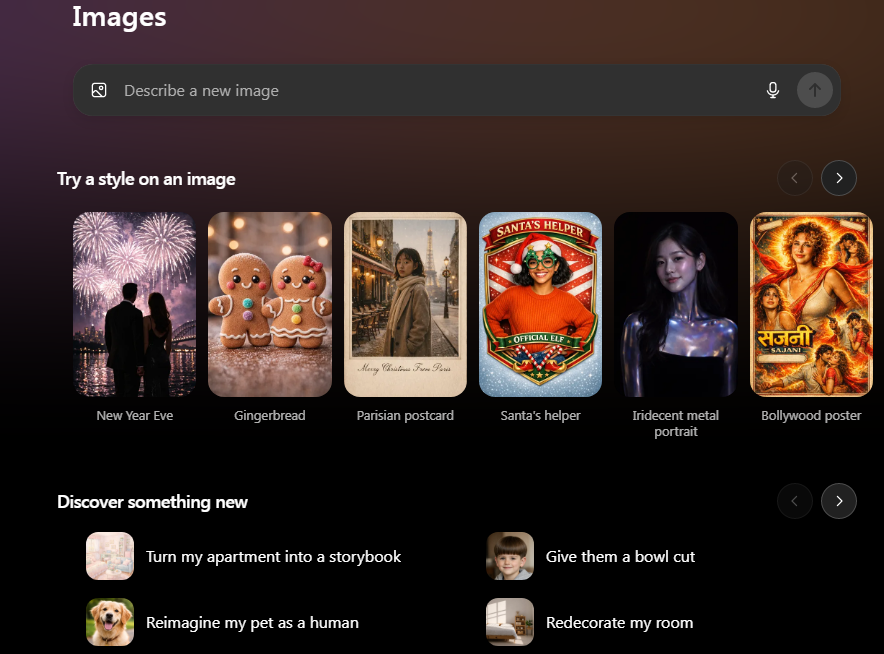
The new ChatGPT Images experience, powered by GPT Image 1.5, is available to all ChatGPT users. OpenAI has also introduced a dedicated Images tab that serves as a hub for accessing images you’ve generated and creating new ones. This interface provides convenient access to different styles and sample prompts to help users get started.
For developers, GPT Image 1.5 is available through the API, delivering all the same improvements as the ChatGPT interface. Business and Enterprise access is being rolled out separately , with enterprise integration allowing organizations to deploy and scale securely.
How the Model Handles Image Generation
Behind the impressive outputs of ChatGPT’s image generator lies a sophisticated technical framework designed to interpret user prompts with unprecedented accuracy. GPT Image 1.5 processes prompts through multiple layers, converting words into high-dimensional embeddings that capture semantic relationships before building visual structures step by step.
Prompt interpretation and layout planning
GPT Image 1.5 reads natural language conversationally, understanding context, spatial relationships, and temporal references with remarkable precision. The model employs attention mechanisms to focus on critical words and phrases within prompts, isolating descriptive terms—colors, textures, actions—and amplifying their influence on the generated image. This selective focus ensures that elements deemed most important appear prominently in the visual output.
During processing, the model first creates a rough image outline in latent space, establishing basic shapes and composition. Subsequently, it performs multiple refinement passes, enhancing clarity, color fidelity, and textural detail. This structured approach ensures that complex prompts with multiple constraints are interpreted accurately, resulting in outputs that closely align with the intended visual direction.
Rendering improvements for small text and faces
One significant advancement in GPT Image 1.5 is its capability to handle denser and smaller text with greater clarity. Unlike previous models that struggled with typography, this version excels at rendering crisp lettering, consistent layouts, and strong contrast inside images. This improvement makes the model particularly valuable for creating infographics, diagrams, and other text-rich visuals.
Moreover, the model demonstrates robust facial and identity preservation capabilities. When editing images containing people, GPT Image 1.5 maintains consistent facial features across multiple edits—a crucial advancement for portrait work and character consistency in multi-step workflows.
Scene composition and object placement logic
GPT Image 1.5 handles complex structured visuals, including infographics, diagrams, and multi-panel compositions. The model can manage up to 10-20 different objects in a single scene, significantly outperforming previous systems that struggled with more than 5-8 objects. This capability enables users to create intricate compositions while maintaining precise relationships between elements.
For effective scene composition, the model processes prompts in layers: subject, environment, lighting, style, and technical specifications. It pays particular attention to framing and perspective instructions, such as “wide-angle view,” “close-up macro shot,” or “bird’s eye view,” which guide composition without requiring technical photography knowledge.
Editing Capabilities in ChatGPT Image Generator
The editing interface in ChatGPT’s image generator marks a substantial advancement in AI-powered visual modification. Unlike previous image generation tools, GPT Image 1.5 delivers exceptional control over specific image elements.
Selective editing with detail preservation
One remarkable aspect of this new model is its ability to make precise edits without compromising image integrity. When you select portions of an image, the system changes only what you explicitly request. This precision editing maintains critical details like facial likeness, skin tone, and branded elements throughout modifications.
Combining and blending multiple image elements
GPT Image 1.5 excels at complex compositing operations. The model can effectively transplant elements between images , match lighting conditions, and adjust perspective automatically. This capability proves invaluable for inserting objects or people into different scenes while preserving realistic visual relationships.
Maintaining lighting and composition consistency
Perhaps the most impressive technical achievement is how the model preserves environmental consistency. Throughout multiple edits, lighting direction, shadows, and color temperature remain intact. This ensures that newly added elements appear naturally integrated rather than artificially imposed.
Handling object removal and background fill
The select tool offers powerful object removal capabilities. After highlighting unwanted elements, the model intelligently fills the space with contextually appropriate background content. Nevertheless, some limitations exist—the system occasionally struggles with complex additions in already-defined areas.
Performance, Cost, and Use Case Improvements
The newest generation of ChatGPT’s image tool brings speed and efficiency that opens up practical applications beyond experimentation. This update marks a pivotal shift toward production-ready enterprise applications.
4x faster generation speed in GPT Image 1.5
Speed improvements in GPT Image 1.5 are dramatic, with images now generating in just 5-8 seconds. This fourfold acceleration transforms workflows by allowing rapid concept exploration and iteration. For enterprise teams creating marketing assets at scale, this translates to reducing per-asset creation time from approximately 45 minutes to merely 10 minutes.
20% cheaper API usage for image inputs/outputs
Beyond speed, cost efficiency has improved substantially. Image inputs and outputs now cost 20% less compared to GPT Image 1. This pricing reduction compounds savings for high-volume deployments. According to pricing documentation, square images cost approximately $0.01 (low quality), $0.04 (medium quality), and $0.17 (high quality).
Use cases: ecommerce, branding, and marketing
E-commerce businesses benefit immensely from these improvements through:
-
Rapid product photography generation without expensive photo shoots
-
Creation of seasonal campaign visuals and promotional materials
-
Development of lifestyle imagery showing products in real-world contexts
-
Packaging design visualization and mockups
Marketing teams can now maintain consistent brand elements across multiple edits , making logo creation and visual asset development more streamlined.
Preset styles and prompt suggestions in ChatGPT Images
Currently, the platform includes dozens of preset filters and prompts that spark creativity. These presets, updated regularly to reflect emerging trends, provide starting points for users unfamiliar with effective prompting techniques.
Conclusion
GPT Image 1.5 represents a significant leap forward in AI-powered image generation technology. This latest iteration demonstrates remarkable improvements across several key areas, primarily through its enhanced editing capabilities and preservation of critical image elements.
The technical advancements underpinning this new model have yielded tangible benefits for users. First, the fourfold increase in generation speed transforms creative workflows, allowing rapid iteration and concept exploration. Second, the 20% reduction in costs makes high-volume image generation more economically feasible for businesses and individual creators alike.
Most notably, GPT Image 1.5 excels at precision editing - changing only what users specifically request while maintaining consistent lighting, composition, and facial features throughout the process. This ability to preserve image integrity while making selective modifications addresses a longstanding challenge in AI image generation.
Real-world applications of this technology extend far beyond casual experimentation. E-commerce businesses can now generate product photography without expensive photo shoots, while marketing teams benefit from consistent brand representation across multiple edits. The model’s improved handling of text elements also makes it particularly valuable for creating infographics, diagrams, and other text-rich visuals.
ChatGPT’s new image generator stands as a testament to the rapidly evolving capabilities of visual AI. Users now have access to a tool that combines exceptional control with improved speed and reduced costs - a combination that transforms AI image generation from an interesting novelty into a practical, production-ready solution for creative professionals and businesses alike.
FAQs
-
How does ChatGPT’s new image generator work?
ChatGPT’s new image generator, GPT Image 1.5, uses advanced AI to interpret text prompts and create images. It processes prompts through multiple layers, converting words into visual structures step-by-step, resulting in more accurate and detailed image generation.
-
What are the main improvements in GPT Image 1.5?
GPT Image 1.5 offers faster generation speed (up to 4x), better editing capabilities, improved text rendering, enhanced facial and identity preservation, and more accurate object placement. It also provides 20% cheaper API usage for image inputs and outputs.
-
Can GPT Image 1.5 edit existing images?
Yes, GPT Image 1.5 excels at precision editing. It can add, subtract, combine, and blend elements while preserving the original image’s essential qualities. The model maintains consistent lighting, composition, and facial features throughout edits.
-
How many images can be generated with ChatGPT’s image tool?
While there’s no specific limit mentioned, the improved speed and reduced costs allow users to generate and iterate on more images within the same budget. The exact number would depend on the user’s subscription plan and usage.
-
What are some practical applications of GPT Image 1.5?
GPT Image 1.5 has various applications, including e-commerce product photography, marketing asset creation, infographic design, and brand visual development. It’s particularly useful for rapid concept exploration, seasonal campaign visuals, and creating lifestyle imagery showing products in real-world contexts.
All this information is Open-Source and also avaliable at OpenAI’s official site, you can also get more deeper information from here.
Frequently Asked Questions
How does ChatGPT's new image generator work?
ChatGPT’s new image generator, GPT Image 1.5, uses advanced AI to interpret text prompts and create images. It processes prompts through multiple layers, converting words into visual structures step-by-step, resulting in more accurate and detailed image generation.
What are the main improvements in GPT Image 1.5?
GPT Image 1.5 offers faster generation speed (up to 4x), better editing capabilities, improved text rendering, enhanced facial and identity preservation, and more accurate object placement. It also provides 20% cheaper API usage for image inputs and outputs.
Can GPT Image 1.5 edit existing images?
Yes, GPT Image 1.5 excels at precision editing. It can add, subtract, combine, and blend elements while preserving the original image’s essential qualities. The model maintains consistent lighting, composition, and facial features throughout edits.
How many images can be generated with ChatGPT's image tool?
While there’s no specific limit mentioned, the improved speed and reduced costs allow users to generate and iterate on more images within the same budget. The exact number would depend on the user’s subscription plan and usage.
What are some practical applications of GPT Image 1.5?
GPT Image 1.5 has various applications, including e-commerce product photography, marketing asset creation, infographic design, and brand visual development. It’s particularly useful for rapid concept exploration, seasonal campaign visuals, and creating lifestyle imagery showing products in real-world contexts.